Invoice PDFs into an Excel list
Takes a folder of Japanese invoice PDFs and produces an Excel list and a payment schedule. Every amount it reads is re-calculated; anything that doesn't add up is marked “Review” with the reason.
- Input
- Invoice PDFs (with selectable text)
- Output
- One Excel file with 3 sheets: the list and the payment schedule
- Checks
- 12 checks, including consumption tax, duplicate billing, and registration numbers
The invoices it read
Seven invoices from four fictitious vendors, each vendor with its own layout. All but 02 contain a deliberate problem, such as duplicate billing or wrong tax.
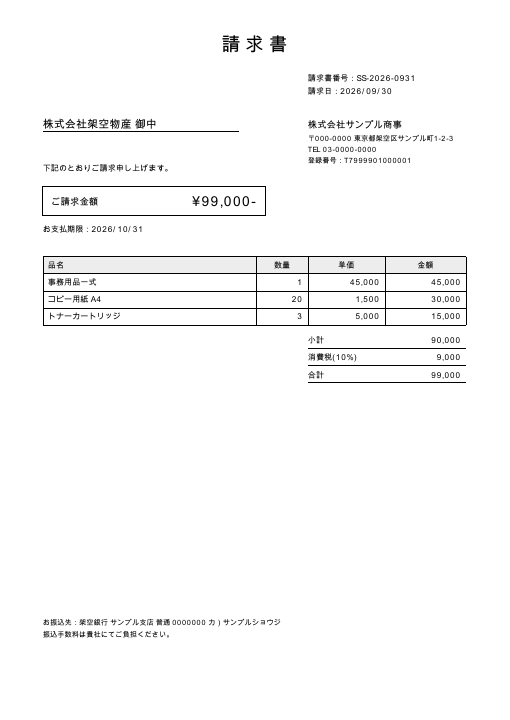
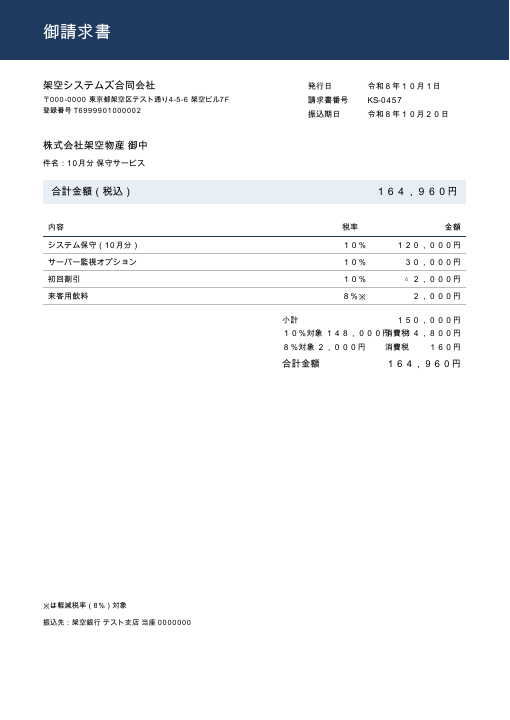
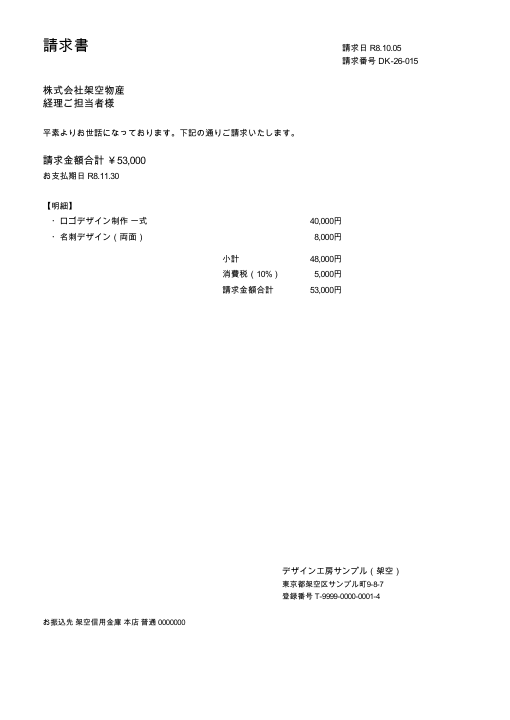
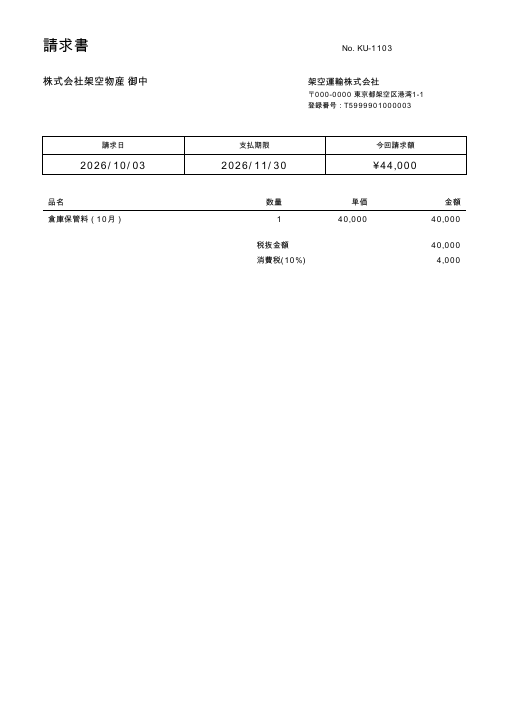
Of the other three, 04 uses the same layout as 02, 05 is a reissue of 01, and 06 is a PDF with no text (standing in for a scan). Click an image to open the PDF.
The Excel it produced
Of 7 invoices, 1 came out OK and 6 were marked for review, each with a reason. The tables below are translated from the Japanese output.
List sheet
| File | Vendor | Invoice no. | Total | Result | Reason for review |
|---|---|---|---|---|---|
| 01_ | Sample Shoji Co., Ltd. | SS-2026-0931 | ¥99,000 | Review | Possible duplicate: the same vendor and invoice no. SS-2026-0931 also appear in 05_sample-shoji_SS-2026-0931_resend.pdf |
| 02_ | Kaku Systems LLC | KS-0457 | ¥164,960 | OK | |
| 03_ | Design Kobo Sample (fictitious) | DK-26-015 | ¥53,000 | Review | 10% consumption tax of ¥5,000 does not match ¥48,000 × 10% = ¥4,800 (off by more than the ¥1 rounding allowance) |
| 04_ | Kaku Systems LLC | KS-0471 | ¥88,000 | Review | Due date 2026/09/10 is before the issue date 2026/10/10 |
| 05_ | Sample Shoji Co., Ltd. | SS-2026-0931 | ¥99,000 | Review | Possible duplicate: the same vendor and invoice no. SS-2026-0931 also appear in 01_sample-shoji_SS-2026-0931.pdf |
| 06_ | Review | No text can be extracted from the PDF (probably a scanned image; OCR is out of scope) | |||
| 07_ | Kaku Unyu Co., Ltd. | KU-1103 | Review | Could not read: issue date, due date, total |
Columns such as issue date, due date, subtotal, tax, and registration number are omitted here. Due dates are on the payment schedule below.
Payment schedule sheet
Sorted by due date, with the days left until a reference date (here 2026/10/15). Overdue is red; due within 7 days is yellow.
| Due date | Days left (as of 2026/10/15) | Status | Vendor | Invoice no. | Total | Result |
|---|---|---|---|---|---|---|
| 2026/09/10 | -35 | Overdue | Kaku Systems LLC | KS-0471 | ¥88,000 | Review |
| 2026/10/20 | 5 | Due within 7 days | Kaku Systems LLC | KS-0457 | ¥164,960 | OK |
| 2026/10/31 | 16 | Sample Shoji Co., Ltd. | SS-2026-0931 | ¥99,000 | Review | |
| 2026/10/31 | 16 | Sample Shoji Co., Ltd. | SS-2026-0931 | ¥99,000 | Review | |
| 2026/11/30 | 46 | Design Kobo Sample (fictitious) | DK-26-015 | ¥53,000 | Review | |
| Due date unknown | Review | |||||
| Due date unknown | Kaku Unyu Co., Ltd. | KU-1103 | Review |
The file name column is omitted.
Download this Excel file (original, in Japanese, all columns)10KB
What it checks
If any of these fails, the invoice is marked for review with the reason.
- Subtotal + tax = total
- Sum of the line items = subtotal
- Qty × unit price = amount, on every line
- Tax = taxable amount × rate (within ¥1)
- If the total appears more than once, all of them match
- If the tax or taxable amount for a rate appears more than once, they match
- The invoice registration number is T + 13 digits
- The check digit of a corporate registration number
- The due date is not before the issue date
- No other file has the same vendor and invoice no. (duplicate billing)
- All required fields were read
- Text can be extracted from the PDF
For tax, a difference of up to ¥1 is accepted, since rounding down, up, or to nearest are all in use. The registration number is the one required under Japan's qualified invoice system; its check digit is verified with the corporate number formula set out by the National Tax Agency and the ministerial ordinance.
How it uses AI
Only the fields the rules could not read are passed to AI (Claude). Each value AI returns is matched against the text actually in the PDF, and only values that match are used. They then go through the same checks as values read by the rules.
The Excel above was produced with AI turned off, so 07 is marked for review. In a separate run with AI turned on, AI filled in the issue date, due date, and total for 07, the checks passed, and 07 came out OK. The “Read by” column then shows which fields AI filled in.
AI is optional on every run. When it is on, the text of the PDFs concerned is sent to Anthropic. When it is off, nothing leaves the machine.
Limitations
- Scanned PDFs (images with no text) cannot be read. OCR is out of scope. They are flagged for review with a reason.
- With layouts unlike the four samples, the rules may leave some fields unread. AI can fill them in, but a value that cannot be matched against the PDF text is not used.
- A tax-inclusive note (うち消費税, “of which consumption tax”) is not read as the tax amount.
- One invoice per file.
- It does not look up whether a registration number exists in the National Tax Agency's public registry.
- Foreign currencies are not supported.
Technology
A command-line tool in Python 3.10, using pdfplumber to read PDFs and openpyxl to write Excel. 151 tests; tested on macOS.